

Choosing the right payroll software can make or break your operations. The wrong tool is confusing, expensive, or leaves you chasing support when something goes wrong. The right one saves hours each month, handles taxes automatically, and gives you peace of mind.
In this article, we’ll break down real Gusto payroll reviews, the pros, cons, pricing, and exactly how it works, so you can decide if it’s the right fit for your business.
What is Gusto Payroll software?
Gusto is an all-in-one payroll and HR software designed to help small and medium-sized businesses manage employee payments, taxes, and benefits with ease.
It automates everything from calculating salaries and withholding taxes to filing payroll forms and sending direct deposits. Beyond payroll, Gusto also offers tools for hiring, onboarding, time tracking, and managing employee benefits, making it a simple, cloud-based solution for businesses that want to streamline HR without the hassle of manual paperwork.
How does Gusto Payroll work?
Gusto payroll works by automating the entire payroll process, from calculating employee pay to filing taxes. Here’s a quick breakdown of how it works:
- Set Up Your Business and Team: You start by adding your company details, tax information, and employee or contractor profiles. Gusto then syncs with federal, state, and local tax requirements automatically.
- Run Payroll: Each pay period, Gusto calculates wages, tax withholdings, and deductions for benefits or retirement plans. You can also add bonuses, reimbursements, or overtime pay with a few clicks.
- Automatic Tax Filing: Gusto files payroll taxes and forms (like W-2s and 1099s) on your behalf with the IRS and local agencies, helping you stay compliant without extra effort.
- Direct Deposits & Employee Self-Service: Employees receive their pay via direct deposit, and they can access pay stubs, tax forms, and benefits information in their Gusto online account.
In short, Gusto handles the heavy lifting of payroll so small business owners can pay their teams accurately and on time without worrying about tax errors or missed deadlines.
What are the Features of Gusto Payroll Software?
Here’s a detailed explanation of Gusto payroll software features

1. Full-Service Payroll
Gusto offers complete payroll automation, allowing small businesses to run payroll as often as needed without extra fees. It calculates employee wages, tax withholdings, and deductions for benefits or retirement plans automatically.
With just a few clicks, you can process payroll, and employees are paid via direct deposit or check. This eliminates manual calculations and reduces the risk of errors that could lead to tax penalties or unhappy staff.
2. Employee Self-Service
One of Gusto’s most convenient features is its employee self-service portal. Instead of HR or the business owner manually distributing pay stubs or tax forms, employees can log in to their own Gusto accounts to view pay history, download W-2s or 1099s, and manage personal details.
New hires can also self-onboard by completing tax documents and direct deposit information digitally, saving time and reducing paperwork.
3. Automatic Tax Filing & Compliance
Gusto takes care of payroll taxes from start to finish. It automatically calculates, withholds, and files federal, state, and local payroll taxes on your behalf.
The platform also prepares and submits year-end forms like W-2s for employees and 1099s for contractors. This built-in compliance feature ensures that your business stays on top of tax deadlines and reduces the risk of penalties.
4. Time Tracking & Attendance
With Gusto, tracking employee hours and time off is seamless. The platform integrates time tracking directly into payroll, so hours worked, overtime, sick leave, and vacation days are automatically reflected in each pay run.
This ensures employees are paid accurately for their time, and managers don’t have to manually cross-check attendance records.
5. Employee Benefits Management
Gusto goes beyond payroll by helping businesses offer and manage employee benefits. It supports health insurance, 401(k) retirement plans, commuter benefits, and workers’ compensation.
Deductions are automatically taken from payroll, and benefit options can be managed directly within the platform, making it easier for businesses to attract and retain talent.
6. Integrations
The software integrates with popular tools like QuickBooks, Xero, TSheets, and other HR and accounting software. These integrations allow for smooth data flow between payroll and other business systems, eliminating duplicate data entry and giving you a more connected workflow.
7. Reports & Insights
Gusto provides detailed reporting tools that give you insights into payroll costs, tax payments, and employee earnings. You can generate custom reports for accounting, compliance, or strategic planning, making it easier to monitor cash flow and prepare for audits or financial reviews.
Gusto Reviews: Pros and Cons
Gusto reviews highlight that while many small business owners love its automation and ease of use, others point out limitations that might not fit every company’s needs.
1. Pros of Gusto Payroll
- Easy to Use: Many small business owners highlight Gusto’s clean interface and simple step-by-step payroll process. Even users with no HR background can quickly set up and run payroll.
- Automated Tax Filing: Gusto automatically calculates, withholds, and files federal, state, and local payroll taxes, saving time and reducing the risk of mistakes or late penalties.
- Employee Self-Service Portal: Employees can access pay stubs, W-2s, and 1099s online, update personal information, and manage benefits without HR intervention.
- All-in-One HR Features: Beyond payroll, Gusto offers onboarding, time tracking, and benefits management, making it a convenient solution for small teams.
- Great User Experience & Customer Satisfaction: Gusto often receives high ratings on sites like Trustpilot and Capterra for its intuitive platform and smooth payroll processing.
Cons of Gusto Payroll
- Limited International Payroll: Gusto primarily supports U.S.-based payroll. Companies with international employees may need additional tools or services.
- Customer Support Delays: Some users on Trustpilot and Reddit report slow or inconsistent responses from customer support during high-demand periods.
- Pricing Can Add Up: While competitive for small businesses, the per-employee fees can become expensive as your team grows.
- Fewer Advanced Features for Large Enterprises: Gusto is best for small to medium-sized businesses; it lacks certain complex reporting and customisation options large companies may need.
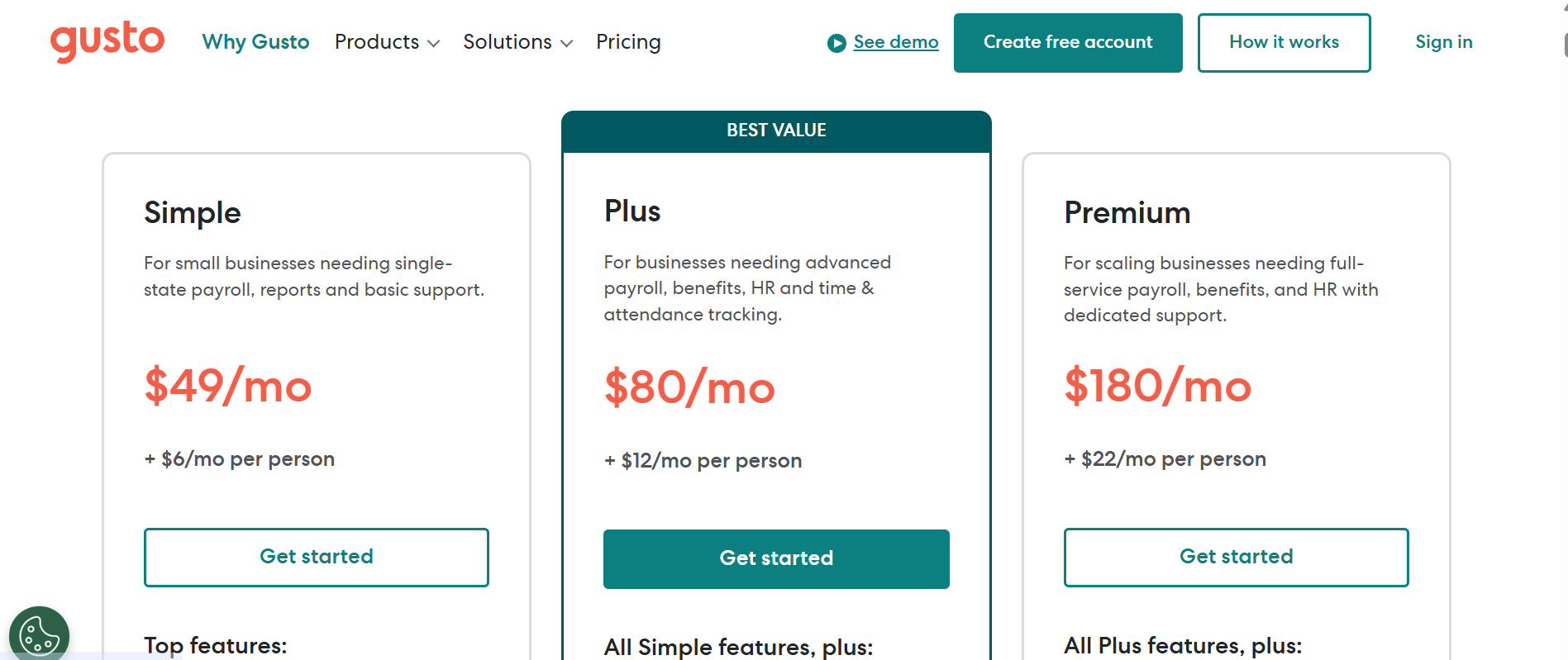
Pricing: How Much Does Gusto Charge for Payroll?
Gusto’s pricing is structured around tiered plans based on your business size and feature needs. Here’s a current summary:
| Plan | Monthly Base Fee | Per Employee/Contractor (PEPM) | Best For |
| Simple | $40 | $6 | Small businesses with single‑state payroll needs |
| Plus | $80 | $12 | Growing businesses with multi-state payroll, PTO, time tracking |
| Premium | $180 | $22 | Scaling firms needing HR support, compliance help, and dedicated service |
| Contractor‑Only | — | $35/month base + $6 per contractor | Businesses hiring only contractors (no employees) |
| Gusto Global (EOR) | Custom pricing | $599–$699 per employee per month | International payroll via Employer of Record services |
Is Gusto better than QuickBooks for payroll?
| Feature | Gusto | QuickBooks Payroll |
| Ease of Use | Very beginner‑friendly | Moderate; better if you use QuickBooks |
| HR & Benefits Tools | Full HR suite + onboarding | Limited HR features |
| Tax Filing | Automatic federal, state & local | Automatic in Core & Premium plans |
| Direct Deposit Speed | 2‑day (Next‑day in Plus+) | Same‑day in Premium/Elite |
| Pricing (per 10 employees) | $149–$200/month | $90–$200/month |
| Accounting Integration | Basic; exports to QuickBooks/Xero | Seamless (native) |
Final verdict
Gusto is better for small businesses that need a simple, full-service HR and payroll solution, while QuickBooks Payroll is better for QuickBooks users focused on accounting integration and faster payouts.
If you’re leaning toward Gusto, start with their free setup and explore its features risk‑free. Try Gusto Payroll Today