

You’ve got traffic, but no clue what your visitors are doing? You’re not alone.
Maybe your site looks great, your content is solid, and you’re even getting clicks. But still… no conversions. No sales. No idea why people leave.
That’s where Hotjar comes in, and why it’s become a favorite for beginner marketers like us.
In this Hotjar review, we’ll break down the good, the bad, and whether this tool is worth your time (and money—or lack of it!).
What is Hotjar?
Hotjar is a user behavior tool that shows what people do on your website.
Think of it as your website’s secret CCTV. Instead of just seeing traffic numbers, you’ll watch how real users scroll, click, tap, rage-click, and bounce off your site.
Here’s what it does, in plain terms:
- Hotjar heatmaps: Visual reports showing where people click, scroll, or ignore.
- Session recordings: Watch real visitor sessions (anonymously!) to spot problems.
- Feedback tools: Ask users what they think, right there on your site.
- Surveys & polls: Gather insights directly from your audience.
It’s gold for beginners. No coding skills needed. Simply install a tiny snippet, and you’re all set.

Hotjar Features
1. Heatmaps
Hotjar’s Heatmaps offer a visual overview of how users interact with your web pages. By tracking clicks, cursor movement, and scrolling behavior, you can quickly identify which areas of a page attract the most attention and which are being ignored.
This helps in understanding user intent, improving page layout, and making data-informed decisions about design and content placement.
For instance, if users consistently ignore your CTA or fail to scroll far enough to view important content, a heatmap makes this immediately obvious.
2. Session Recordings
Session Recordings allow you to replay individual user visits to your site, showing their exact journey, where they click, scroll, hesitate, or leave. Watching real-time behavior reveals friction points that analytics tools alone can’t surface.
Whether it’s a confusing navigation path or a button that doesn’t work as expected, these recordings let you step into the user’s shoes and experience your site the way they do. It’s a powerful tool for diagnosing issues, improving usability, and validating design changes.
3. Feedback Tools (Ask)
Hotjar’s feedback tools let you gather direct input from users through surveys, polls, and feedback widgets. These tools can be embedded on your site or triggered contextually based on user actions. They help you understand the “why” behind user behavior, like
- Why someone abandoned a cart
- What confused them on a landing page
- How they feel about your service.
The platform also uses AI to analyze sentiment in responses, helping you spot trends and act on insights more efficiently. It’s beneficial when launching new features, optimizing content, or validating user experience assumptions.
4. User Interviews & Tests (Engage)
The Engage feature enables you to conduct live user interviews and usability tests directly from the Hotjar platform. You can invite participants from your audience, or use Hotjar’s tester pool to recruit based on your target user profile.
These interviews help you go beyond what users do on your site and uncover why they behave that way. Listening to real-time feedback can clarify misconceptions, validate features, and inspire new product ideas. It’s ideal for product managers, UX researchers, and marketers looking to add human context to their data.
5. Funnels & Trends (Observe)
With Funnels and Trends, Hotjar lets you map out and analyze how users move through key flows on your website—like sign-ups, checkouts, or onboarding. You can see where people drop off, how long they take between steps, and how their behavior changes over time.
This insight is crucial for identifying and fixing leaks in your conversion funnel. It’s especially effective for tracking performance across segments, comparing device types, or validating A/B test results with behavioral context.
6. Highlights & Collaboration
Hotjar makes it easy to share key findings across your team by letting you clip, tag, and comment on essential moments from session recordings, heatmaps, or feedback submissions. These highlights can be organized into collections or shared via tools like Slack, Notion, or Trello.
This encourages collaboration between teams, like product, design, and development, and helps ensure that everyone stays aligned on the most impactful user insights. It also speeds up decision-making, since stakeholders can act on clear evidence without needing to dig through raw data themselves.
7. Events & Custom Attributes
Hotjar gives you the flexibility to track specific user actions and enrich them with context by using custom events and attributes. This allows you to focus on behaviors that matter most to your business, such as video plays, downloads, plan upgrades, or product views.
You can also filter users based on attributes like account type, region, or customer lifecycle stage. This level of customization is especially valuable for SaaS platforms, marketplaces, or any digital product that requires nuanced behavior tracking beyond basic pageviews.
8. Console Tracking & Error Reporting
In addition to user behavior, Hotjar also monitors technical issues through console tracking and error reporting. If a JavaScript error occurs during a user’s session, it’s logged and tied to the exact session recording where it happened.
This feature gives developers and QA teams the ability to watch bugs in action and understand their impact. Instead of relying solely on error logs, teams can see what the user was trying to do when the issue occurred, which helps prioritize and resolve problems faster.
9. Form Analytics & Text Entry
Hotjar’s form analytics help you understand how users interact with forms on your site, whether it’s a checkout page, registration form, or lead capture. You can see which fields cause the most friction, how long users take to fill out each step, and where they abandon the process.
When enabled, the tool can even show anonymized text that users type before submitting or abandoning the form. This kind of insight is vital for improving completion rates, reducing cart abandonment, and designing smoother user flows.
10. Dashboards & Reports
Hotjar offers intuitive dashboards and reporting tools that pull together behavioral and feedback data in one place. These dashboards give you a high-level view of site performance, highlight key user behaviors, and help monitor trends over time.
You can track conversion rates, engagement levels, and friction points, then share these insights with stakeholders in a clear, visual format. It’s especially useful for keeping leadership aligned with product goals and demonstrating the impact of design or content changes.
Hotjar Pros and Cons
Here is a summary of the pros and cons of Hotjar
Pros: What Hotjar Is Good At?
1. Intuitive and easy-to-use
Hotjar has a clean, user-friendly UI, making navigation simple for both beginners and experienced users. For example, a review on TrustRadius from a customer using HotJar to analyze the performance of their website mentioned the ease of use as one of the pros.
2. Comprehensive user behavior analytics
Users consistently praise the combined power of heatmaps (including mouse‑movement), session recordings, fury-click detection, and funnel analytics to uncover usability issues and user frustration points.
One user said they love Hotjar’s heatmaps and recordings since they provide good insights into user behaviour. The same applies to tracking funnels and conversion rates within user journeys.
3. Anonymous session recordings
Hotjar suppresses keystrokes and personal input fields by default, ensuring user privacy while still allowing analysts to observe interactions and behaviors.
4. Quick and simple implementation
Deployment requires only a small JavaScript snippet, and most features work immediately, allowing teams to start gathering insights fast, without much technical setup.
5. Actionable qualitative insights
Combining quantitative data (clicks, scrolls, funnels) with feedback tools (polls, surveys, session comments) lets teams make well-informed decisions backed by real data.
What are the cons of using Hotjar?
1. Data storage and session limits
Lower-tier plans often restrict the number and retention of session recordings. Users requiring longer archives or higher volumes frequently upgrade or consider alternatives.
2. Limited depth in quantitative analysis
While superb for behavior tracking, Hotjar is less robust in detailed analytics like advanced funnel or form analytics, compared to tools like GA or dedicated analytics platforms.
4. Potential website speed impact
Some users report that adding Hotjar may slow page load times, especially on heavier or high-traffic sites.
Hotjar Pricing
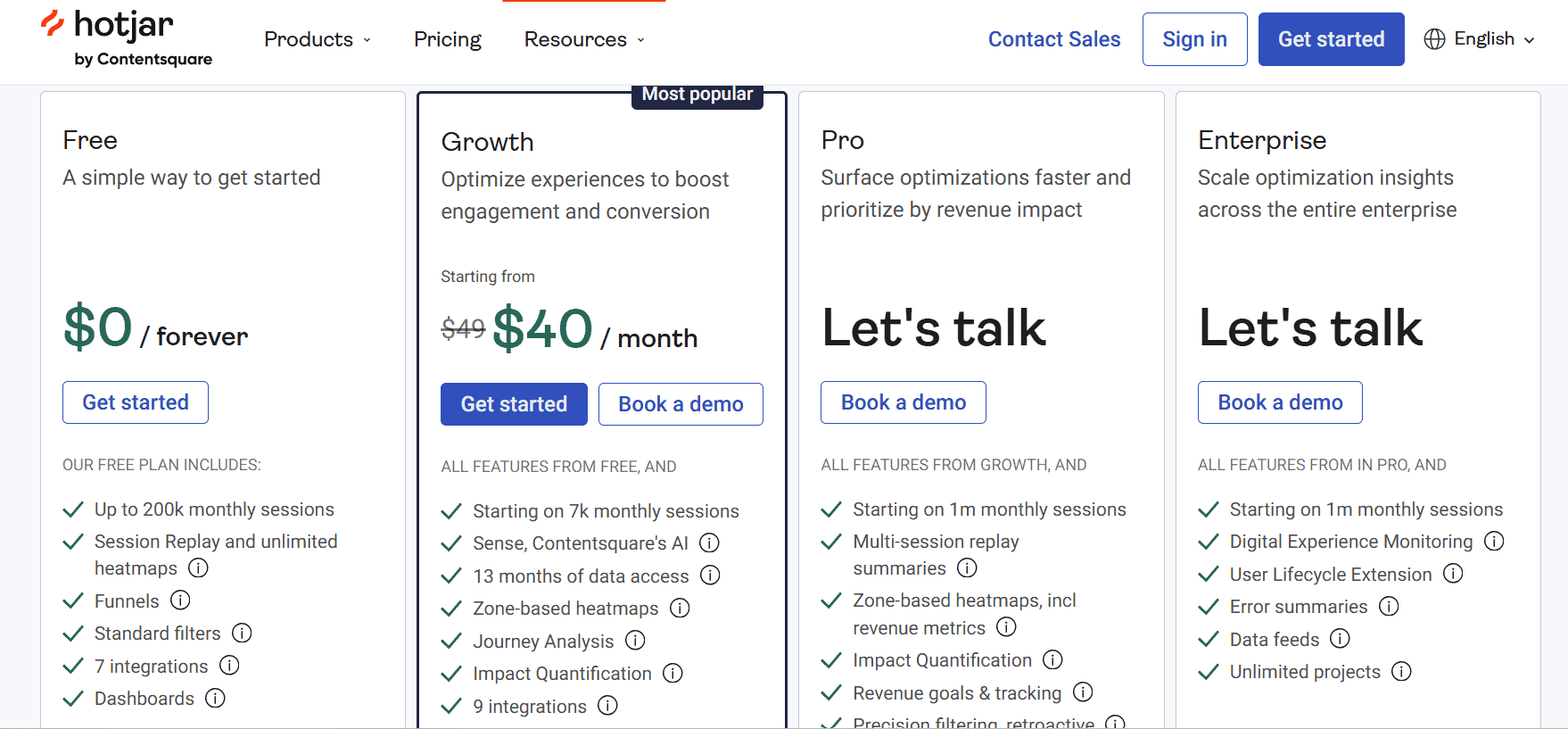
Hotjar offers flexible plans designed for businesses of all sizes, from solo website owners to enterprise teams. Its pricing is split into two main categories: Observe (heatmaps, recordings, and analytics) and Ask (feedback tools and surveys).
- Free Plan – $0/month
- 35 daily session captures
- 3 heatmaps per site
- Basic feedback widgets & surveys
- Best for small sites, blogs, or early-stage startups
- Plus Plan – from $39/month
- 100 daily session captures
- Unlimited heatmaps
- Advanced filtering and segmentation
- Ideal for small businesses and solo marketers who need more frequent insights
- Business Plan – from $99/month
- Up to 500 daily session captures (scalable with site traffic)
- Funnels, Trends, and advanced user insights
- Enhanced feedback features and integrations
- Perfect for growing e-commerce or SaaS companies
- Scale Plan – from $213/month
- Thousands of daily sessions
- Priority support & account management
- Advanced data export and team collaboration features
- Tailored for high-traffic websites, agencies, and enterprise teams
Pro Tip: Hotjar’s free plan is surprisingly robust for beginners. If you’re just getting started with website optimization, you can collect meaningful insights without spending a dime. Paid plans become valuable when you need more session captures, deeper analytics, and team collaboration tools.
For the updated Hotjar cost, visit the comparison page.
Is Hotjar Free and Worth Using for Understanding User Behavior?
If you’re staring at Google Analytics feeling lost, Hotjar provides the context you need. You’ll finally understand why users leave your site. And you’ll know what to fix, without guessing.
With Hotjar pricing starting at $0, and tools like Hotjar heatmaps included, there’s no reason not to try.
Final Thoughts: Is Hotjar Right for You?
User behavior matters. If you’re serious about improving your site, even as a total beginner, Hotjar is a no-brainer. No excuses now, get started with Hotjar and see what your visitors are really up to.