

Running a medical spa isn’t just about offering great treatments — it’s about juggling complex schedules, managing inventory, handling client relationships, and keeping everything compliant and secure. Many spa owners and managers feel overwhelmed by outdated systems that fail to keep pace with the needs of a modern medspa.
This article dives deep into Boulevard Software Reviews to help you determine whether this platform truly stands out as the best medical spa software in 2025. From must-have features to real customer feedback, pricing comparisons, and how it stacks up against the competition, we’ve covered everything you need to know before making your decision.
What Is Boulevard Software? A Complete Overview
Boulevard is an all-in-one business management platform built specifically for the wellness, beauty, and medspa industries. Designed to simplify the operations side of your business while elevating the client experience, Boulevard has quickly become a top contender in the medspa software market.
Top Features That Set Boulevard Apart
Let’s break down the features that consistently receive praise in Boulevard software reviews:
- Smart Scheduling and Calendar Tools: Boulevard uses intelligent scheduling to minimize gaps, prevent overbooking, and auto-recommend ideal times based on staff availability and client preferences.
- Integrated Point-of-Sale (POS) System: The POS system allows for seamless transactions, retail add-ons, and tipping, ideal for medspas selling both services and skincare products.
- Inventory and Retail Management: Track product sales, monitor inventory levels, and automate restock alerts with ease.
- Client Experience Tools: Boulevard helps medspas provide a white-glove client experience through appointment reminders, aftercare instructions, and smart rebooking prompts.
- Ease of Use: One of the biggest hurdles in adopting new software is training. Fortunately, Boulevard is praised for its modern, intuitive interface and robust onboarding.
- Onboarding Process: New users get hands-on guidance with setup, staff training, and client data imports, all included in the setup fee.
- Learning Curve for New Users: Most users report becoming comfortable within the first week of use, thanks to built-in tutorials and responsive support.
Pros
1. Exceptional Ease of Use & Smooth Onboarding
Boulevard is consistently described as user-friendly, intuitive, and quick to adopt. Users highlight seamless transitions from previous systems, praising the platform’s visual clarity and straightforward design.
2. Excellent Scheduling & Booking Tools
Appointment scheduling is praised due to its smart prompts, clean layout of services, prices, availability, and two-way messaging support. Online booking is highly rated; clients appreciate booking without needing an account and real-time alerts for booking actions.
3. Comprehensive Appointment Management
Centrally managing appointments, confirmations, cancellations, and reminders is seamless. Users also praise automated reminders (via SMS/email) as effective and reduce no-shows; customisation is possible and appreciated.
Cons
1. Limited App Functionality
Several users comment that the mobile app lacks key features (e.g. viewing the full details of appointments or accessing reports), making it less useful, especially for managers on the go.
2. Glitches in Scheduling Logic
While scheduling is generally strong, it might have confusing “random booking” behavior, overlapping appointments, gaps where smart scheduling fails, or misaligned auto-populated times.
3. Higher Cost Relative to Alternatives
Boulevard is considered more expensive than many competitors, especially for small businesses. Its price tiers ($195 – $455/month), combined with add-on fees, place it on the premium end of the market.
4. Support Documentation & Feature Awareness Issues
Some users report outdated or hard-to-find support articles and incomplete communication about feature updates, which leads to confusion when changes go unannounced.
5. Feature Gaps in Integrations & Tipping UI
Missing integrations can frustrate users: e.g. no built-in connection to Instagram, Facebook, or Wix; and tipping interfaces sometimes allow accidental fractional tips ($0.10 instead of $10).
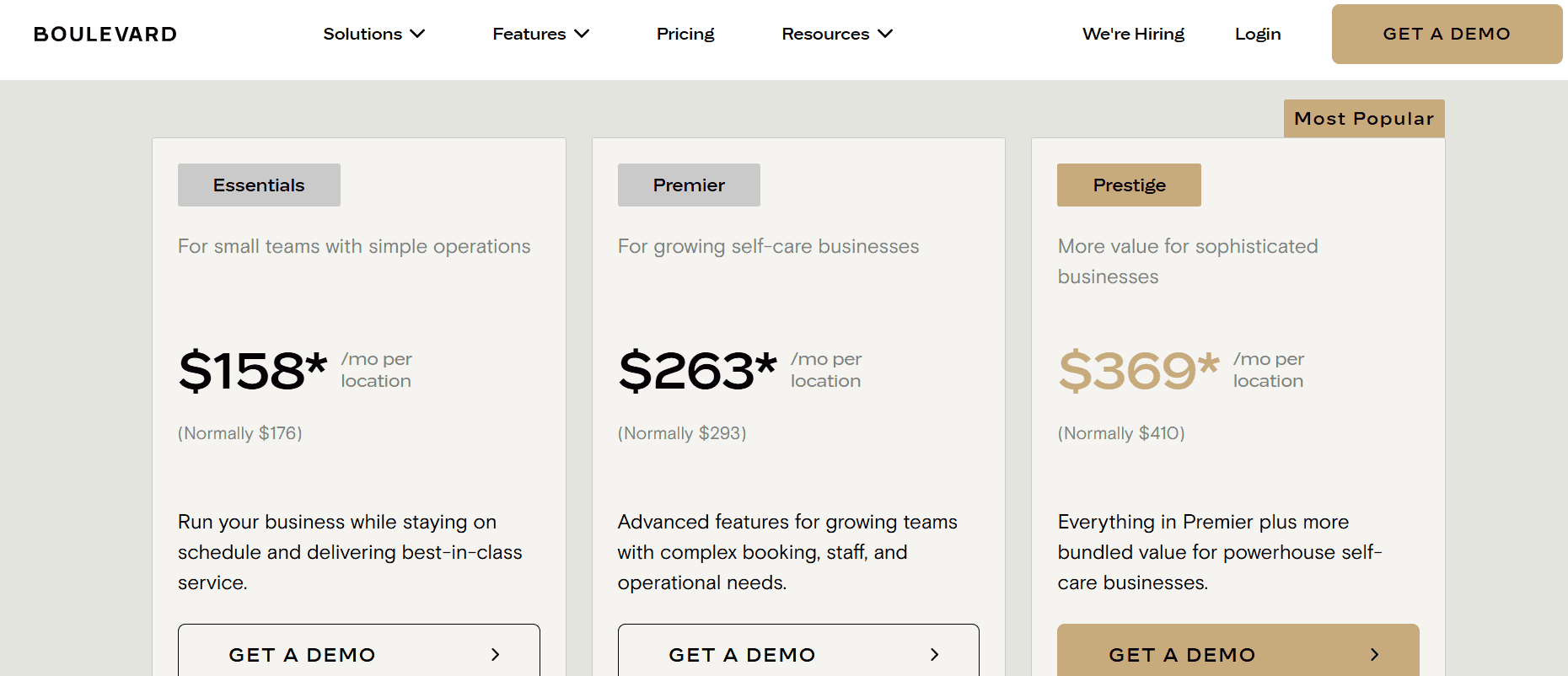
Boulevard Pricing: How Much Does It Cost?
Boulevard offers tiered pricing for self-care businesses like salons and medspas, with plans tailored to different team sizes and feature needs:
| Plan | Starting Price (per location/month) | Key Features Included |
| Essentials | $158 (discounted from $176) | Basic booking, POS, client profiles, scheduling, text/email confirmations |
| Premier | $263 (discounted from $293) | Adds inventory, group check-in, booking deposits, advanced reporting |
| Prestige | $369 (discounted from $410) | Includes forms add-on, bulk messaging, priority support, expanded email/SMS credits |
| Enterprise | Custom pricing via consultation | Fully tailored for large, multi-location operations |
| Aesthetics Bundle (for medspas) | $455 to $520 | Medspa-specific features and packages |
Visit Boulevard Pricing page to learn more
Bottom Line: Is Boulevard Worth It?
Choose Boulevard if you’re operating a growing or medium-to-large salon or medspa and need a comprehensive, intuitive platform that consolidates booking, POS, marketing, and client engagement in one tool.
That said, if you’re a solo practitioner or small team, you may find the features and pricing beyond what’s necessary, making alternatives like Fresha or GlossGenius more cost-effective options.
Ready to Streamline Your Salon or Medspa Operations?
If you’re running a growing salon or medspa and want a comprehensive platform for booking, payments, client management, and marketing, all in one place, Boulevard Software is a strong choice. With intuitive design, smooth onboarding, and tiered pricing for different scales, it’s built to help your business grow.
Try Boulevard risk‑free to experience the power of its scheduling, POS, and client engagement tools firsthand.
Related Article: Corpay One Reviews: Is it right for your business?